Our end-to-end Power BI training is made for individuals who want to learn Power BI at their own pace. Whether you're using it at work or want to boost your resume, this course gives you the skills to confidently create dashboards and reports — without needing any prior experience.
✔ Fully online via Podia
✔ Practice with real-world data
✔ Step-by-step guidance through all key phases
✔ Hands-on, logical, and easy to follow ✔ Personal Trainer options to get live Q&A sessions
By the end of the training, you’ll have created your own working report — and if you're ready for more later on, we also offer additional advanced modules.
A personal trainer doesn't just hand you a book about fitness. They watch you, correct your form, push you when needed, and adapt to your goals. That's exactly what this program does for Power BI.
Learn at your own pace with structured, focused modules
Apply every lesson to test data immediately
Bring your actual questions to live Q&A sessions
Build confidence that lasts — not just course completion
How we can help
Contact us if you are looking to start your Power BI training at your company. No matter if you are just starting with Power BI or want to make sure all your users follow the same training. We offer our online training to companies with a group discount, plus weekly status reports on progress and we offer the option to organize Q&A sessions, where users can then ask questions about the training they followed, or some of the reports they are trying to develop.
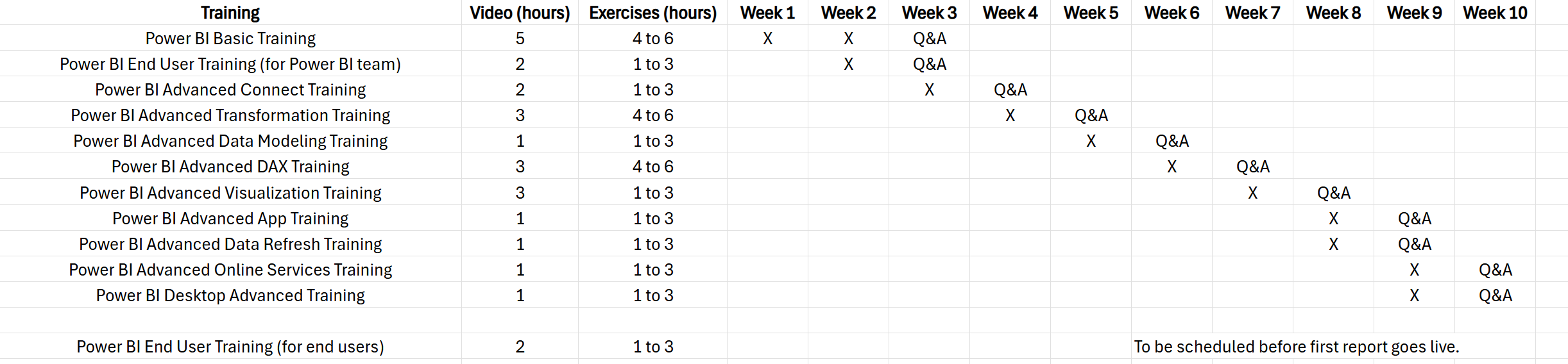
Here is example of a 10 week training schedule that is completely online with weekly Q&A sessions.